
Overview
Through the use of its settings, it is possible to configure the webpage to provide information to the visitor, SEO information, configuration of frontend blocks and other features.
The settings are internal to the webpage and are not the content of the webpage, but the meta-data of the webpage may impact how the content of the page is displayed on the frontend.
How to
Adjust Page settings:
Expand the Web module, click on the website title and the page tree will appear on the right. Find the page you want to work on and click the three vertical dots next to the page name. Click on Page Settings.
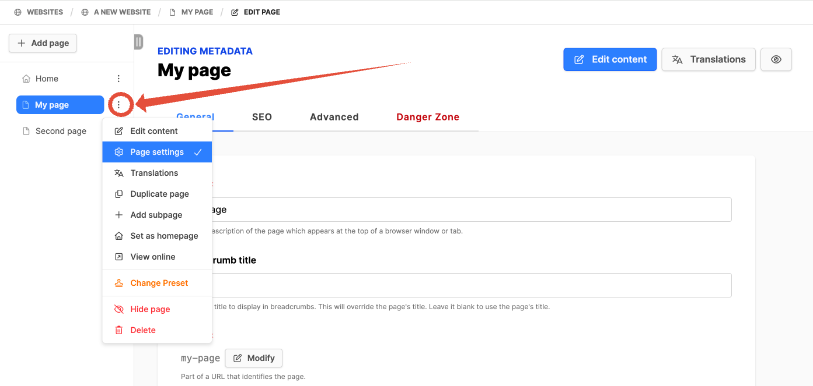
There are various configuration settings for a page. Click the blue Update button if you edit any information.
- General tab
- Title: short description displayed on browser tab or window
- Breadcrumb title: title to display in breadcrumbs. Use to override Title.
- Slug: becomes the URL path for the page
- Description: Meta-Description for the page
- Language: use only if necessary to override website language for the page
- Icon: used in places (e.g. menus) to graphically represent this page
- Layout: select only if the page layout is to be changed
- Image: Main image for this page.
- Visibility of the page:
- Hide in Menus: don't display the page as a menu element
- Hide in Sitemap: don't display the page in sitemap
- Hide in Breadcrumbs: don't display the page in Breadcrumbs
- Chromeless: Hide standard design of the website this page
- SEO tab
- Configuration of the page for SEO, and Facebook & Twitter sharing
- Design (Hope Design only)
- Adjust design of the page for preconfigured settings
- Advanced tab
- Publish dates: schedule dates when page should appear or be hidden
- Page access: use Authentication functionality to protect pages (website authentication activated)
- Password protected page: use a password to lightly secure a page
- Dynamic content: use to dynamically provide data to certain frontend blocks on the page
- XML Content: page output is XML, for RSS feeds (shows or articles)
- JSON: page output is JSON, for app deep linking
- Text: page output is plain text, for robots.txt file
- HTML: page output is HTML (Note! a dangerous option, exposes site to security vulnerabilities)
- Danger Zone tab
- Delete page